





Which Transeiver Type Works Best?
 Oct 21, 2025|
 There isn't a "best" transeiver type-there's only the right one for your specific network architecture. I learned this the hard way when I watched a logistics company waste three weeks troubleshooting phantom network issues, only to discover their brand-new optical modules were multimode optics plugged into single-mode fiber. The modules weren't defective. The selection process was.
The optical module market reached $13.6 billion in 2024 and is racing toward $25 billion by 2029, driven by 5G rollout and AI infrastructure demands. Yet choosing the right module remains surprisingly complex. Cisco alone offers 17 different 10G SFP+ models. Without a systematic approach, you're essentially guessing-and in a market where optical modules can cost more than the switches they plug into, guessing gets expensive fast.
This guide introduces the 6D Decision Matrix-a framework that transforms the overwhelming spec sheets into six sequential decisions. By the end, you'll understand not just which types exist, but precisely which one your network actually needs.
Why Selection Breaks Most Networks Before They Launch
Before diving into solutions, let's confront what makes optical module selection treacherous.
The Compatibility Catastrophe
Over 70% of fiber optic link failures stem from connector and module issues, not cable problems. Here's what that looks like in practice: An engineer orders "10G modules" without specifying wavelength. They receive 1310nm modules for end A and 850nm modules for end B. Both ends show link lights. Zero data flows. The wavelengths simply don't speak the same language.
The issue runs deeper than wavelength. OEM vendors embed proprietary coding into optical modules that won't function unless the device recognizes the "correct" vendor ID. This isn't about performance-it's vendor lock-in disguised as compatibility. A perfectly functional module becomes a $500 paperweight because the switch rejects its digital handshake.
The Distance Deception
A customer deployed SFP-10G-LRM optics rated for 300 meters on what they measured as a 280-meter cable run. Within days, they experienced intermittent packet loss and random disconnections. The diagnosis? Their actual cable path-snaking through ceilings and around corners-exceeded 320 meters.
The margin for error in optics is unforgiving. Unlike copper cables that gracefully degrade, optical signals hitting their distance limit don't slow down-they collapse. One meter beyond spec can mean the difference between 99.999% uptime and chronic instability.
The Hidden Cost Multiplier
At OEM pricing, optical modules frequently cost more than the networking hardware itself. Gartner Research didn't mince words, labeling OEM optics "The Biggest Rip Off in Networking." A national logistics company saved $2.1 million-not by changing their network design, but by switching from OEM to properly coded third-party modules across seven facilities. That's not a discount; that's a budget line item bigger than most companies' entire networking refresh.
The economics matter because wrong choices compound. Select an over-spec'd module, and you're not just overpaying once-you're buying spares, replacements, and future expansions at inflated prices. Select an under-spec'd module, and you're paying for replacements plus the downtime costs of emergency troubleshooting.
Understanding the Landscape: Form Factors That Actually Matter
The market spans from 1G to 800G, with new form factors emerging as bandwidth demands escalate. Here's what's actually deployed in 2025:
SFP and SFP+ (The Workhorses)
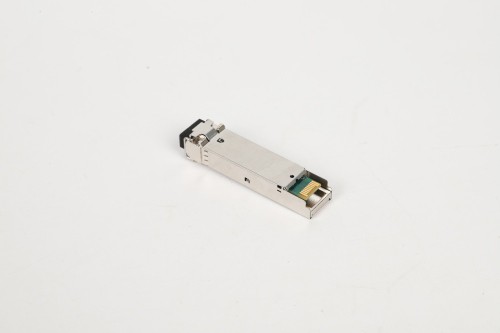
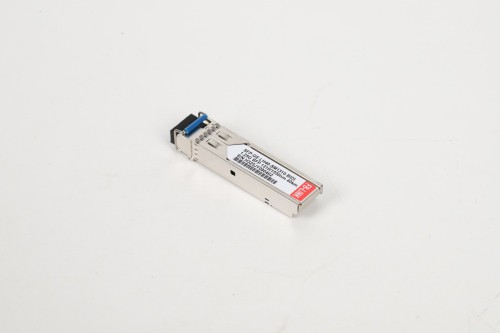
Small Form-factor Pluggable modules remain the most widely deployed globally. Standard SFP handles 1G connections, while SFP+ pushes 10G. Their popularity stems from hot-swappable design and broad compatibility with legacy infrastructure.
Cisco's SFP-10G-SR (short-range, multimode, 850nm) represents the archetypal enterprise data center module: 300-meter reach over OM3 fiber, affordable, and nearly universal compatibility. For longer runs, SFP-10G-LR switches to single-mode fiber at 1310nm for 10-kilometer reach. The price delta? Roughly 3-4x, reflecting the precision optics required for single-mode transmission.
One critical detail: SFP and SFP+ share identical physical dimensions. An SFP+ module fits seamlessly into an SFP slot-but won't function. The 10G module cannot auto-negotiate down to 1G speeds. This physical compatibility without functional compatibility creates the single most common deployment error in enterprise networks.
QSFP, QSFP28, and QSFP-DD (The Capacity Builders)
Quad Small Form-factor Pluggable modules aggregate multiple channels. QSFP handles 40G (4×10G lanes), QSFP28 reaches 100G (4×25G lanes), and QSFP-DD (Dual Density) doubles to 200G or 400G by utilizing 8 lanes.
The economics of QSFP favor high-density environments. A single QSFP28 module replacing four SFP+ modules reduces port count, power consumption, and cable management complexity. Data centers building out 100G spines increasingly standardize on QSFP28 for precisely this density advantage.
QSFP-DD introduces backward compatibility as a strategic feature. A 400G-capable slot accepts QSFP28 or standard QSFP modules, protecting infrastructure investments during gradual upgrades. This matters in hyperscale environments where forklift upgrades are economically impractical.
OSFP and 800G (The Bleeding Edge)
Optical Small Form-factor Pluggable doubles QSFP-DD capacity, supporting 800G today with 1.6T on the roadmap via 8×200G channels. OSFP targets AI training clusters and hyperscale data center backbones where every port matters.
The market for 800G modules grew 27% in 2024, driven primarily by Nvidia AI infrastructure orders and hyperscaler network upgrades. However, 800G deployment remains concentrated in specific use cases-GPU-to-GPU interconnects, spine switches in mega data centers, and carrier core networks. For enterprise edge or campus networks, 800G represents over-engineering by several orders of magnitude.
BiDi and WDM Technologies (The Distance Extenders)
Bidirectional modules transmit and receive on a single fiber strand using different wavelengths-typically 1270nm transmit and 1330nm receive, or vice versa. This halves fiber requirements, a significant advantage in long-haul scenarios or fiber-constrained environments.
Wavelength Division Multiplexing (WDM) takes this further. DWDM (Dense WDM) modules can multiplex 40, 80, or even 96 different wavelengths onto a single fiber pair, with each wavelength carrying a separate 10G, 25G, or 100G channel. The economics favor WDM for distances beyond 40 kilometers or when fiber strands are prohibitively expensive to add.
DAC and AOC (The Short-Haul Specialists)
Direct Attach Cables (copper) and Active Optical Cables hard-wire modules onto fixed-length cables. A 3-meter 40G QSFP DAC costs roughly $30 compared to $200+ for two separate modules plus fiber. For intra-rack or adjacent-rack connections, DACs represent the cost floor.
The trade-off? Zero flexibility. A 5-meter DAC cannot be repaired if one end fails-you replace the entire assembly. And thick shielding on high-speed DACs creates restrictive bend radius requirements that complicate dense rack installations. For planned, stable connections under 7 meters, the economics overwhelmingly favor DACs. For anything requiring future flexibility, discrete modules plus fiber win.
The 6D Transeiver Decision Matrix: A Sequential Framework
Choosing optical modules isn't about evaluating all factors simultaneously-it's about answering six questions in the right order, from most constraining to most flexible.
Dimension 1: Distance (The Eliminator)
Start here because distance is binary. An optical module either reaches your required span, or it doesn't. No amount of budget or preference changes physics.
Decision Logic:
Under 100m: Multimode fiber with copper or 850nm optics (SR modules)
100m-2km: Single-mode fiber with 1310nm optics (LR modules) or multimode with LRM modules
2km-40km: Single-mode with 1310nm or 1550nm depending on budget
40km-80km: Single-mode with DWDM or specialized long-reach modules (ZR modules)
Over 80km: Coherent optics or amplified DWDM solutions
Always add 20% margin. If your measured run is 250 meters, specify modules rated for 300+ meters minimum. Attenuation from connectors, splices, and fiber aging isn't hypothetical-it's guaranteed.
One customer learned this measuring cable "as the crow flies" at 9 kilometers, then discovering their actual fiber path-following road rights-of-way with service loops-stretched to 11.3 kilometers. Their 10km-rated modules worked intermittently on sunny days and failed completely when temperature fluctuations increased attenuation. The fix required replacing every module with 40km-rated optics, quadrupling their budget.
Dimension 2: Data Rate (The Requirement)
Once distance narrows your options, data rate further constrains them. This isn't about what speed you want-it's about what your application genuinely requires.
Decision Framework:
1G: Sufficient for most enterprise edge, IP cameras, legacy equipment
10G: Current standard for server connectivity, campus aggregation
25G: Server NICs in modern data centers (often aggregated to 100G uplinks)
40G: Largely skipped in new deployments in favor of 100G
100G: Data center spines, service provider aggregation
200G-400G: Hyperscale data center fabrics, carrier core
800G: AI clusters, next-gen hyperscale cores
Here's where organizations overspend most frequently. A 10G-to-40G spine upgrade might seem logical, but if current utilization peaks at 12%, jumping to 40G (4x capacity) delays the next upgrade by perhaps two years while immediately quadrupling costs. Better strategy: implement 25G with a clear path to 100G, matching infrastructure investment to actual growth curves.
The counter-case: underbuilding. Deploying 10G when current traffic already peaks at 60% utilization means you've bought yourself 12-18 months before forced upgrade. The equipment hasn't depreciated, but it's already obsolete. In fast-growth scenarios-particularly AI/ML workloads or video production-overbuilding by one generation proves cheaper than upgrading twice.
Dimension 3: Density (The Physical Reality)
Port density determines whether your selected module even fits your hardware strategy.
A 48-port SFP+ switch occupies 1U of rack space. Four 12-port QSFP28 switches provide equivalent port count (48×10G = 480G total; 48×100G = 4.8T total) but consume 4U. For the same physical footprint, QSFP-DD delivers 8x the bandwidth of SFP+ while reducing power consumption per gigabit by approximately 35%.
The density calculation extends beyond switches. Cable management for 48 individual fiber pairs versus 12 QSFP cables differs dramatically. Installation labor, troubleshooting time, and operational complexity all scale with connector count. One data center operator calculated that reducing port count from 240 to 60 (via higher-capacity modules) saved 18 hours per year in routine maintenance-time worth far more than price differentials.
Dimension 4: Dollars (The Budget Reality)
With distance, speed, and density constraining your options, now evaluate Total Cost of Ownership across your remaining choices.
The OEM vs Third-Party Decision:
OEM modules from Cisco, Juniper, or HPE provide guaranteed compatibility and full feature support. They're also priced at 200-400% premiums over third-party alternatives. Gartner's assessment wasn't exaggeration-it was arithmetic.
Certified third-party modules from reputable suppliers achieve 99.98% reliability rates, identical to OEM products, because they're manufactured in the same Asian factories using identical components. The difference? The absence of brand markup.
Real numbers: A Cisco QSFP-100G-LR-S costs approximately $5,000 list price. A properly coded third-party equivalent costs $1,200-1,800. Over a 48-port deployment, that's $153,600 (OEM) versus $57,600 (third-party)-a $96,000 delta on modules alone. The savings funded two additional switches in one deployment I analyzed.
The TCO Hidden Variables:
Power consumption: 100G QSFP28 PSM4 consumes ~3.5W; 100G CFP2 consumes ~24W. Over three years at $0.12/kWh, that's $31 vs $214 per module in electricity
Cooling overhead: Every watt of IT power requires 1.5-2.0 watts of cooling in typical data centers
Sparing strategy: 10% spare inventory on $5,000 modules versus $1,500 modules creates dramatically different cash requirements
Failure replacement: Lifetime warranty from third-party vendors eliminates replacement costs; OEM warranties typically cover 1-3 years
Calculate TCO over your infrastructure refresh cycle (typically 3-5 years), not purchase price. The lowest initial cost rarely equals lowest total cost.
Dimension 5: Durability (The Environmental Factor)
Operating temperature determines whether standard commercial modules survive your deployment environment.
Temperature Ratings:
Commercial: 0°C to 70°C (32°F to 158°F)
Industrial: -40°C to 85°C (-40°F to 185°F)
Industrial modules cost 40-80% premiums but represent the only option for outdoor deployments, cellular towers, factory floors, and any environment without climate control. One telecommunications provider deployed commercial modules in outdoor cabinets to save budget. Eighteen months later, they had a 34% failure rate in northern installations where winter temperatures regularly dipped below -10°C. The replacement project cost 3x their original "savings."
Beyond temperature, consider:
Electromagnetic interference: Industrial modules include enhanced shielding for factories, power substations, or environments with heavy electrical machinery
Vibration resistance: Mobile deployments or industrial settings require modules rated for shock and vibration
Altitude: Modules in mountain installations or aircraft require specific thermal designs for low-pressure environments
Dimension 6: Device Compatibility (The Integration Reality)
Your last variable-but potentially most frustrating-is vendor compatibility and coding requirements.
Modern modules include EEPROMs storing vendor ID, serial numbers, and compatibility information. OEM switches read this data and reject modules without approved vendor IDs. This isn't standards compliance-IEEE defines specifications without vendor lock-in. This is deliberate market segmentation.
The Compatibility Tiers:
OEM-to-OEM: Guaranteed to work, maximum cost
Certified third-party: Properly coded for specific platforms, works identically to OEM, massive savings
Generic third-party: May work, may trigger warnings, may fail unpredictably
Modules from different OEM: Generally won't work without recoding
Reputable third-party vendors maintain compatibility matrices showing tested combinations. Edgeium, AddOn Networks, and similar suppliers test modules against Cisco, Juniper, HPE, Dell, and Arista platforms, then code EEPROMs accordingly. This isn't reverse engineering-it's reading published MSA (Multi-Source Agreement) standards and implementing them correctly.
One critical detail: some vendors claim "universal compatibility." This doesn't exist. A module coded for Cisco won't function in Juniper gear. Vendors offering true universal compatibility maintain separate SKUs coded for different platforms. If the vendor can't specify which platforms they've tested against, walk away.
Real-World Decision Trees: Three Common Scenarios
Scenario 1: Enterprise Data Center Server Connectivity
Requirements:
Distance: 5-30 meters (server to ToR switch)
Data rate: 25G per server
Budget: Cost-sensitive
Scale: 400 servers across 10 racks
Decision Process:
Distance (5-30m): Multimode or DAC eligible
Data rate (25G): SFP28 form factor
Density: Standard-1U per 48-port ToR switch works
Dollars: DAC for <5m (intra-rack), multimode SFP28 for >5m
Durability: Commercial (data center environment)
Compatibility: ToR switches are Cisco Nexus → require Cisco-coded third-party modules
Selected Solution:
280× 25G SFP28 SR modules (OM4 multimode, 100m rated)
120× 3m QSFP28-to-4×SFP28 breakout DACs
Total cost: ~$182,000 (third-party) vs ~$520,000 (Cisco OEM)
Three-year TCO including power: ~$195,000 vs ~$551,000
Scenario 2: Campus Building-to-Building Backbone
Requirements:
Distance: 2.8 kilometers between buildings
Data rate: 100G aggregate (future-proofing for 10 years)
Budget: Balanced-uptime matters more than initial cost
Environmental: Outdoor fiber in underground conduit
Decision Process:
Distance (2.8km): Single-mode required
Data rate (100G): QSFP28 form factor
Density: Low port count (4 links total), not a factor
Dollars: Will pay premium for reliability
Durability: Industrial rating for underground temperature swings
Compatibility: Existing Juniper core switches
Selected Solution:
4× 100G QSFP28-LR4 industrial-grade modules (10km rated, provides 3.5x margin)
Single-mode OS2 fiber (already installed)
Juniper-coded third-party industrial modules
Total cost: ~$9,200 (vs $6,400 for commercial-grade that would fail in winter)
Insurance against temperature-related failures: priceless
Scenario 3: Hyperscale Data Center Spine/Leaf Architecture
Requirements:
Distance: <100 meters (all within single data center)
Data rate: 400G spine, 100G leaf-to-spine
Scale: 32 leaf switches, 8 spine switches
Budget: Optimize TCO over 5 years
Decision Process:
Distance (<100m): Multimode eligible
Data rate (400G/100G): QSFP-DD for spine, QSFP28 for leaves
Density: Critical-288 spine ports total
Dollars: TCO-focused calculation over 5 years
Durability: Commercial (controlled environment)
Compatibility: Arista switches
Selected Solution:
Spine: 64× 400G QSFP-DD SR8 modules (OM4 multimode)
Leaf-to-spine: 256× 100G QSFP28 SR4 modules (OM4 multimode)
Total initial cost: ~$422,000 (third-party) vs ~$1,680,000 (Arista OEM)
Five-year TCO including power, cooling, spares: ~$486,000 vs ~$1,847,000
Savings funded additional spine switches for redundancy
The Mistakes That Cost Millions: What Not to Do
Mistake 1: Mixing Multimode and Single-Mode
It bears repeating: multimode modules cannot communicate with single-mode modules under any circumstances. The fiber core diameters differ by an order of magnitude (50-62.5μm vs 9μm). Light from a multimode laser scatters in single-mode fiber; light from a single-mode laser underfills multimode fiber.
One enterprise deployed single-mode modules at their headquarters end and multimode at branch offices to "save money on the branch side." Zero links established. The $47,000 in "discounted" multimode modules became waste, replaced entirely with single-mode modules.
Mistake 2: Ignoring Wavelength Matching
An 850nm module (multimode standard) cannot communicate with a 1310nm module (single-mode short reach). This seems obvious when stated plainly, yet it represents approximately 15% of support calls.
The subtler trap: DWDM wavelengths. In a 40-channel DWDM system, channel 1 might use 1528.77nm while channel 2 uses 1529.55nm-a 0.78nm difference. Deploying the wrong channel wavelength means light never reaches the intended receiver. Always verify wavelength matching, not just "type" matching.
Mistake 3: Over-Specifying for "Future-Proofing"
Deploying 100G modules when current utilization peaks at 8Gbps doesn't future-proof-it present-wastes. Technology evolves faster than depreciation cycles. Today's 100G module will be technologically obsolete before it's financially depreciated.
Better strategy: build one generation ahead of current requirements. If you're at 8Gbps peak, deploy 25G with clear upgrade paths to 100G. The 25G infrastructure (switch ports, fiber, cable management) remains valuable when you eventually add 100G uplinks.
Mistake 4: Buying "Universal" Generic Products
"Works with all major brands" is a red flag, not a feature. Without vendor-specific coding, these modules may physically fit but won't function-or worse, will function with degraded performance that creates intermittent failures.
Symptoms include: link flapping, CRC errors, DDM (Digital Diagnostic Monitoring) unavailable, reduced distance capacity, and unexpected reboots. One network experienced 3% packet loss that appeared only during high-traffic periods. Root cause: "universal" modules that couldn't maintain signal integrity under load.
Mistake 5: Ignoring Fiber Plant Quality
The best module in the world cannot compensate for contaminated, damaged, or spec-violating fiber. One customer deployed premium 40km modules on fiber that had never been cleaned since installation in 2009. Link budget margins disappeared under contamination layer. Cleaning the connectors resolved issues immediately-no module change required.
Before replacing modules, test:
Optical power levels: Use an optical power meter to verify received power falls within specifications
Link loss budget: Calculate total link loss (fiber + connectors + splices) and compare to specifications
Connector cleanliness: Inspect with fiber microscope; clean with appropriate tools
Fiber integrity: OTDR test reveals breaks, excessive bends, or splice problems
Emerging Trends Reshaping Selection in 2025-2026
The 800G Acceleration
AI training workloads drove 27% market growth in 2024, concentrated in 400G and emerging 800G modules. Nvidia's AI infrastructure orders alone represent substantial portions of 800G shipments. This isn't general enterprise demand-it's hyperscale and AI-specific.
For typical enterprises, 800G remains 5-7 years out. Current deployments center on 25G server connections with 100G aggregation. The 400G tier will see adoption before 800G becomes relevant for non-AI workloads.
Co-Packaged Optics (CPO)
CPO technology integrates optical modules directly onto switch ASICs, eliminating separate pluggable modules. Anticipated to reach 15% of new designs by 2025, CPO targets hyperscale operators fighting power and density constraints.
Trade-offs: lower power consumption and higher density, but zero field serviceability. A failed optic means replacing the entire switch ASIC. For environments prioritizing density over repairability-hyperscale leaf switches, for instance-CPO economics may work. For enterprise networks valuing hot-swap capability, traditional pluggable modules remain superior.
Silicon Photonics Maturation
Silicon photonics leverages semiconductor manufacturing for optical components, dramatically reducing costs while improving performance. This technology underpins the transition to 200Gbps-per-lane modulation, enabling 800G in QSFP-DD form factors.
The impact: higher speeds in existing form factors, extending useful life of current switch platforms. A 400G-capable QSFP-DD port accepting silicon photonics 800G modules delays forklift upgrades by 2-3 years. For enterprises with recent 100G/400G investments, this represents meaningful cost avoidance.
The Third-Party Certification Evolution
Major cloud providers now specify certified third-party modules in RFPs, legitimizing what was once considered "risky." When AWS, Google, and Microsoft deploy third-party optics at petabyte scale, vendor FUD about reliability becomes untenable.
This trend accelerates cost normalization. As third-party modules gain acceptance in mission-critical deployments, enterprises face less internal resistance to cost-saving transitions. Market data supports this: third-party market share grew from 34% in 2020 to 52% in 2024.
Frequently Asked Questions
Can I mix SFP and SFP+ modules in the same switch?
Yes, but with constraints. SFP+ ports accept SFP (1G) modules, and they'll negotiate down to 1G speeds. However, SFP ports cannot accept SFP+ (10G) modules-the 10G module won't auto-negotiate to 1G. Always verify your switch documentation, as some vendors limit backward compatibility.
How do I verify third-party compatibility before purchasing?
Request the vendor's compatibility matrix showing specific switch models they've tested against. Reputable vendors maintain detailed documentation listing firmware versions, switch platforms, and test results. Red flags include: no compatibility matrix available, claims of "universal" compatibility, inability to specify coding methodology, or absence of customer references for your specific platform.
What's the actual failure rate difference between OEM and quality third-party modules?
Industry data shows well-sourced third-party modules achieve 99.98% reliability, statistically identical to OEM products. This shouldn't surprise-they're manufactured in the same facilities using the same components. The variance comes from coding quality and testing rigor. Choose vendors who perform 100% burn-in testing and offer lifetime warranties backed by responsive support.
Should I always match brands on both ends of a link?
No-modules follow IEEE and MSA standards specifically to enable multi-vendor interoperability. A Cisco-coded module at end A communicates perfectly with a Juniper-coded module at end B, provided both use matching wavelengths, fiber types, and data rates. The standards exist precisely to prevent vendor lock-in at the physical layer.
How much performance margin should I build into distance specifications?
Add 20-30% margin minimum. If your measured cable run is 250 meters, specify modules rated for 300+ meters. This accounts for: fiber attenuation over time, additional loss from connectors and splices, temperature-related variations, and measurement error in cable path calculation. Real-world cable paths rarely match straight-line measurements due to service loops, indirect routing, and building penetrations.
What's the real TCO difference between DAC and discrete modules plus fiber?
For distances under 5 meters, DACs cost 60-75% less than discrete modules with fiber. A 3-meter 40G QSFP DAC costs roughly $30 versus $200+ for two modules plus patch cables. However, DACs cannot be repaired-a single failed end requires full replacement. For permanent intra-rack connections, DACs win decisively. For connections requiring future flexibility or exceeding 7 meters, discrete modules provide better long-term value.
Do I need industrial-grade modules for outdoor fiber installations?
If the module itself sits outdoors or in unconditioned spaces, absolutely. Commercial modules rated 0°C to 70°C fail in freezing conditions or extreme heat. Industrial-grade modules (-40°C to 85°C) cost 40-80% premiums but represent the only reliable option. However, if your modules sit in climate-controlled buildings with only the fiber running outdoors, commercial modules work fine-fiber itself tolerates extreme temperatures without issue.
Can I use multimode modules with single-mode fiber or vice versa?
No, never. The physics simply don't work. Multimode fiber has 50-62.5μm cores optimized for 850nm light sources. Single-mode fiber has 9μm cores for 1310nm or 1550nm wavelengths. Attempting to cross-connect creates either complete failure or such severe signal loss that links never establish. This mistake still accounts for roughly 15% of support calls despite being physically impossible to succeed.
Making Your Decision: A Practical Action Plan
You now have the framework. Here's how to apply it systematically to your specific network requirements.
Step 1: Audit Your Infrastructure Reality
Before selecting modules, gather these specific data points:
Physical measurements:
Cable distances (add 20% for routing realities)
Fiber type already installed (single-mode OS2, multimode OM3/OM4/OM5)
Available rack space and power budget
Environmental conditions (temperature ranges, EMI exposure)
Network requirements:
Current peak utilization per link
Projected growth over 3-5 years
Application latency sensitivity
Planned equipment refresh timeline
Vendor specifics:
Switch make/model/firmware version
Current inventory
Vendor support requirements (warranty implications)
One telecommunications company discovered their "10-kilometer" links actually spanned 8.7km to 11.3km across 47 sites. This single measurement correction changed their entire procurement from 10km to 40km modules, avoiding what would have been systematic failures across their network.
Step 2: Apply the 6D Framework Sequentially
Work through each dimension in order, eliminating options at each step:
Distance: Eliminates multimode vs single-mode, short-reach vs long-reach
Data rate: Narrows form factor options (SFP+ vs QSFP28 vs QSFP-DD)
Density: Confirms form factor selection or reveals need for breakout cables
Dollars: TCO analysis between OEM and certified third-party options
Durability: Commercial vs industrial grade based on environment
Device compatibility: Identifies required vendor coding
Document your reasoning at each step. This creates an audit trail explaining why you selected specific modules-invaluable when questioned six months later or onboarding new team members.
Step 3: Validate Against Failure Modes
Before finalizing selection, stress-test your choices against common failure patterns:
Temperature validation: Will your modules experience temperatures outside their rated range? Even briefly? Data centers with seasonal cooling variations or equipment rooms sharing space with building mechanical systems may see wider temperature swings than anticipated.
Power budget calculation: Add up total power consumption plus cooling overhead. One hyperscale deployment discovered their "optimized" selection exceeded power distribution capacity by 18%-caught only during final review before purchase orders went out.
Sparing strategy: How many spares will you stock? At what cost? For $5,000 OEM modules, 10% sparing inventory ties up significant capital. For $1,500 third-party modules, the same inventory represents manageable working capital.
Upgrade path: What happens when you need more capacity in 18-24 months? Can your selected modules and form factors scale, or have you created a future forklift requirement?
Step 4: Start With Pilot Deployment
Don't commit your entire budget on unproven selections. Deploy 5-10% of your requirement as a pilot:
Pilot testing protocol:
Install pilot modules in representative locations (shortest and longest distances)
Monitor for 30-60 days under production load
Track error rates, optical power levels, and temperature performance
Validate DDM (Digital Diagnostic Monitoring) functionality
Confirm vendor support responsiveness
One enterprise piloted third-party modules on non-critical links for 45 days, monitoring performance against OEM modules in parallel deployment. Zero performance difference led to $340,000 savings when they rolled out full deployment using third-party modules for remaining 80% of their requirements.
Step 5: Document Everything
Create deployment documentation including:
Selected specifications and vendor
Compatibility validation test results
Installation date and warranty terms
Optical power measurements at installation
Firmware versions for network equipment
Vendor contact information and support terms
This documentation proves invaluable during troubleshooting, audits, warranty claims, and future expansions. Networks evolve; three years from now, you won't remember why you chose 40km modules for that particular link. Your documentation will.
The Bottom Line: No Universal "Best" Exists
The question "which type works best" has no universal answer because it asks the wrong question. The right question is: "Which transeiver optimally balances my specific distance requirements, bandwidth needs, budget constraints, environmental conditions, equipment compatibility, and growth timeline?"
That's what the 6D Decision Matrix solves. It's not magic-it's methodology. Distance and data rate eliminate 80% of options immediately. Density, dollars, durability, and device compatibility winnow the remaining 20% down to your optimal choice.
Three takeaways matter most:
First: Physics trumps preferences. An optical module either reaches your required distance at your required speed, or it doesn't. No amount of budget or brand loyalty changes the attenuation characteristics of light in fiber. Start with physical requirements; accommodate budget within those constraints.
Second: OEM pricing represents the ceiling, not the baseline. Certified third-party modules from reputable vendors deliver identical reliability at 30-70% cost savings. When hyperscale operators standardize on third-party optics, it's not because they're risk-tolerant-it's because the risk is identical while the economics are vastly superior.
Third: Your network's unique architecture determines the right answer. A 400-server data center, a multi-building campus, and a hyperscale fabric each require fundamentally different strategies. Copy-paste solutions from vendor reference architectures or online forums creates the mismatches that generate 3 AM emergency troubleshooting calls.
The optical module market will double by 2029, driven by AI, 5G, and hyperscale expansion. The form factors will evolve, the speeds will increase, and the acronyms will multiply. But the fundamental decision framework-sequentially constraining by distance, speed, density, cost, environment, and compatibility-remains valid regardless of technological evolution.
Master the 6D framework. Your network's reliability, your budget's health, and your 3 AM sleep schedule will thank you. Whether you're deploying SFP+ for enterprise connectivity or QSFP-DD for hyperscale infrastructure, systematic transeiver selection transforms complexity into confident decision-making that serves your network for years to come.